Design Systems · Enterprise · Energy Sector
Building the
foundation
that scales.
Led the end-to-end development of a comprehensive design system for PLEXOS — Energy Exemplar's industry-leading simulation platform — while architecting two critical enterprise tools and mentoring a three-person design team to successful delivery.
COMPANY
Energy
Exemplar
DURATION
8 Months
ROLE
UX
Designer
TEAM
3 Designers
DELIVERED
10 weeks

27+
Documented components
in the system
10wk
Delivery timeline
for full design system
3
Enterprise tools
designed & shipped
2×
Reference systems
studied (Carbon + Material)
01 — CONTEXT
20+ years of software.
One unified language.
PLEXOS is an advanced energy market simulation platform trusted by utilities, regulators, and analysts worldwide to model complex power systems and forecast market outcomes. Following a major interface redesign, the strategic need emerged: build a design system that could scale with the product's ambitions.
THE PRODUCT
PLEXOS
An advanced energy market simulation platform serving utilities, regulators, and analysts globally. After 20+ years, it underwent a strategic interface overhaul — creating the need for a unified design language to sustain that momentum.
THE CHALLENGE
No Common
Foundations
Without a design system, every new feature risked visual inconsistency. Components were duplicated, interaction patterns diverged, and development velocity slowed. A scalable foundation was needed before the cracks spread further.
THE CONSTRAINT
3-Month
Deadline
The system had to be built, documented, and validated — against Carbon and Material Design best practices — within a compressed timeline. Every decision had to balance rigor with speed, and quality with deliverability.
"A design system is never just a component library — it's a shared language that lets teams move fast without breaking things."
— Design Principle, PLEXOS Design System
02 — TARGET USERS
Two audiences.
One system.
The design system had to serve two fundamentally different user groups simultaneously — each with distinct needs, vocabularies, and success metrics.
PRIMARY USERS
In-House Designers & Developers
The internal team who build with the system daily. Their success metric is velocity — how quickly they can ship new features without reinventing patterns. The system gives them standardized components, clear documentation, and adaptable implementation guidelines that compress decision-making and accelerate deliver
SECONDARY USERS
03 — METHODOLOGY
Adapt, don't
rebuild from scratch.
With a 3-month timeline, we made a deliberate strategic choice: rather than building from zero, we adapted proven foundations from IBM's Carbon Design System and Google's Material Design — customizing them to PLEXOS's unique design language.
01
Strategic
Assessment
Evaluated build-vs-adapt options against timeline constraints. Selected Material Design and Carbon as primary reference frameworks based on documentation quality and enterprise suitability.
02
System
Architecture
Conducted a comprehensive audit of existing PLEXOS components and patterns. Documented the current design language and mapped adaptation requirements to the redesigned interface.
03
Component
Adaptation
Built a mapping matrix between existing PLEXOS elements and reference design systems. Developed adaptation criteria focusing on functionality, visual consistency, and scalability.
04
Documentation
Structure
Architected the documentation hierarchy: Design Principles → Core Elements → Complex Components → Pattern Libraries → Layout Structures. Every component gets usage guidelines, states, specs, and accessibility requirements.
04 — DESIGN PROCESS
8 months.
3 milestones
A structured three-phase approach with clear ownership, recurring validation loops with client and internal teams, and a discipline of documenting every decision as we made it.
PHASE 01
UI Audit
2+ months
Systematic analysis of all existing UI patterns, stakeholder alignment, PRD reviews, and architecture planning.
PHASE 02
Design
System
10 weeks
Systematic analysis of all existing UI patterns, stakeholder alignment, PRD reviews, and architecture planning.
PHASE 03
Cloud Bridge
Parallel
Three-column interface architecture for cloud study management, applying the new design system in practice.
PHASE 04
Query
Generator
Parallel
Three-column interface architecture for cloud study management, applying the new design system in practice.
PHASE 05
Validation
Ongoing
Cross-team reviews with internal and client design teams. Positive feedback validated across all team members.
05 — THE DESIGN SYSTEM
Every component.
Every state. Every spec.
The system covers 27+ components organized into a hierarchical library — from foundational elements to complex patterns — each with full documentation for usage, states, accessibility, and implementation.
Tabs
Charts
Data Tables
Data Tables
Checkboxes
Radion Buttons
Dialogs
Input Fileds
Chips
Acccordions
Card View
Dropdowns
Notifications
Tooltips
Pagination
Toast Messages
Lists
Steppers
Progress Indicators
Status Indicators
Side Sheets
Sliders
Switches
Calendar
Floating Action Button
Charts

06 — ENTERPRISE SOLUTION BUILT
The system in
real products.
Beyond the system itself, I led the design of two critical enterprise tools — both designed using the new design system as its first real-world proof of concept.
PROJECT 02
Cloud Bridge Platform
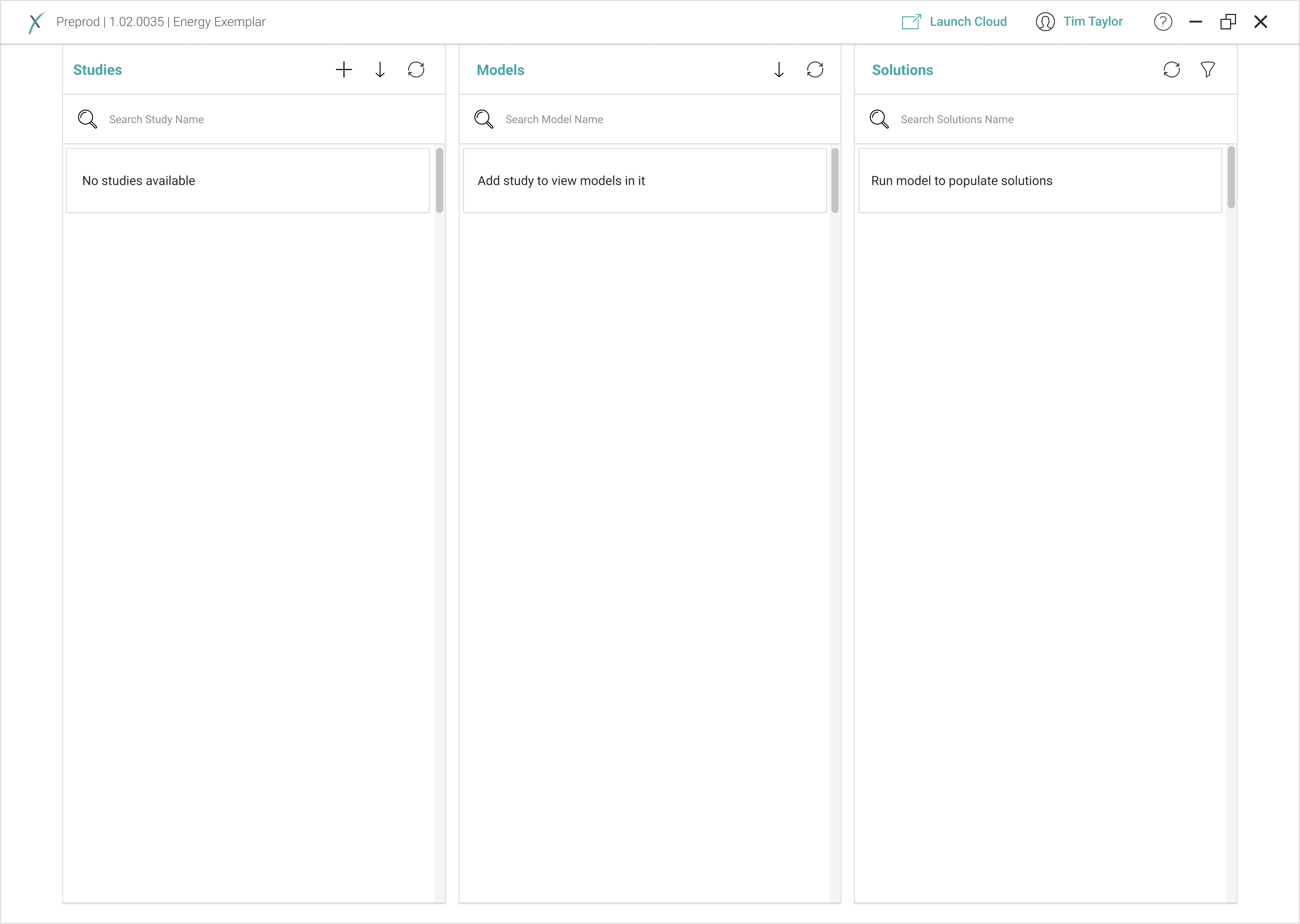
Designed a cloud-based system that reduces reliance on local computers, enabling researchers to run energy studies efficiently using powerful remote resources. The core challenge: how do you make complex cloud infrastructure feel approachable?
The solution: an intuitive three-column layout that maps directly to the user's mental model — Studies → Models → Solutions — with real-time synchronization and progressive disclosure at every step.
LEFT COLUMN
Study Library
Hierarchical view of uploaded studies with quick search, filter, and status indicators. Download and reload capabilities surfaced at the right moment, not cluttering the initial view.
THE CHALLENGE
Model Explorer
Selecting a study dynamically
reveals associated models.
Real-time model status updates with quick search and filter. Each study selection triggers a contextually relevant model display.
RIGHT COLUMN
Study Library
Hierarchical view of uploaded studies with quick search, filter, and status indicators. Download and reload capabilities surfaced at the right moment, not cluttering the initial view.
PROJECT 03
Desktop Query Generator Plugin
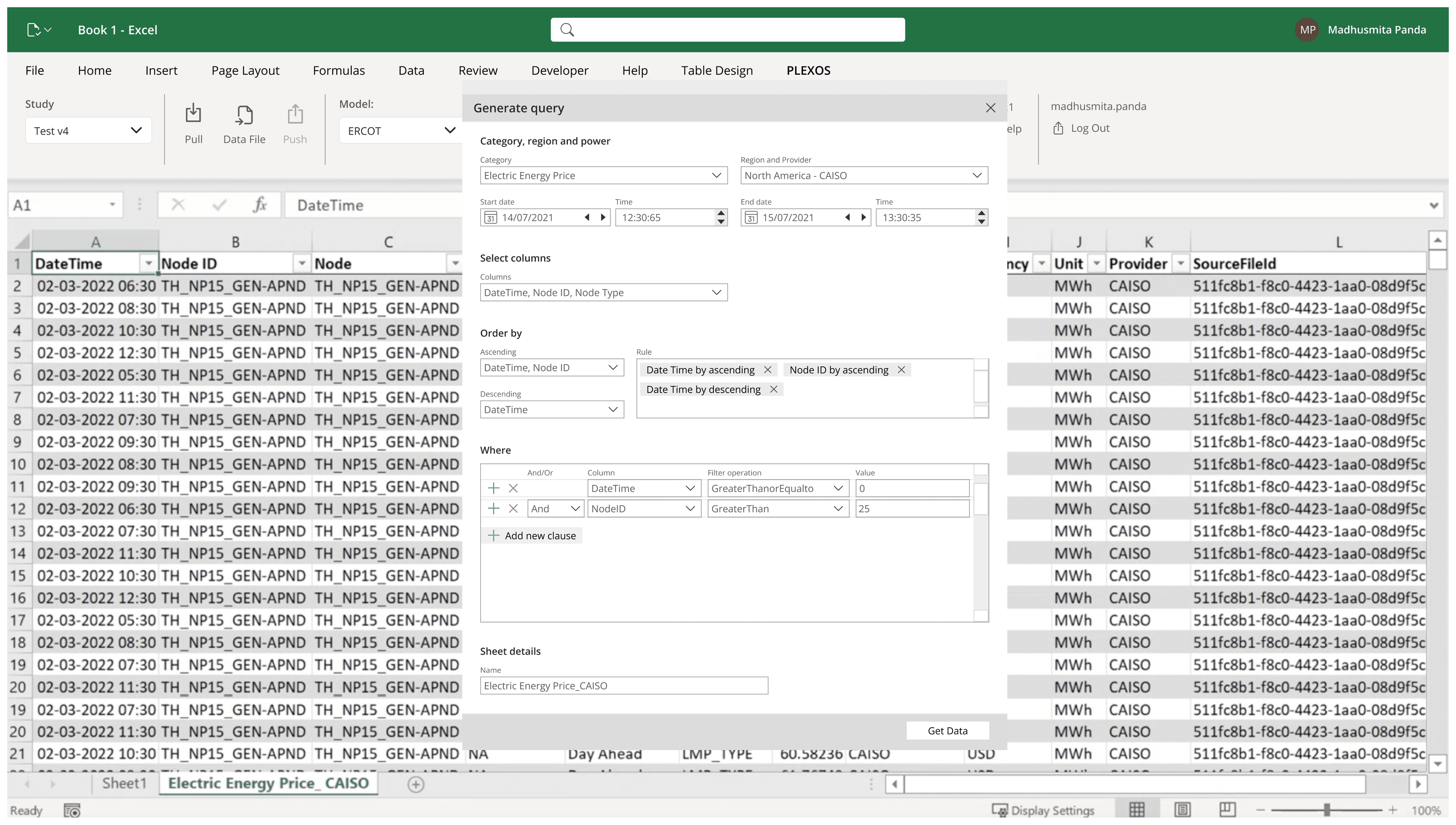
An Excel plugin empowering users to extract precise data subsets from complex spreadsheets using multiple customisable conditions — without writing a single line of SQL or code.
The design challenge was density: complex queries require multiple interdependent inputs across different data types. The solution was a modular input framework with progressive disclosure, dynamic field relationships, and proactive validation — designed to prevent errors before they happen.
01
Modularity First
Hierarchical view of uploaded studies with quick search, filter, and status indicators. Download and reload capabilities surfaced at the right moment, not cluttering the initial view.
Why it matters for PLEXOS users ?
Energy analysts work with multidimensional data. A modular condition builder means they can construct precise queries for renewable vs fossil, peak vs off-peak, regional vs national — without developer support.
02
Error Prevention over Correction
Proactive validation at the field level rather than submission-time error messages. Invalid inputs are flagged as the user types, not after they've built a complex query.
The cognitive cost of late errors
In a multi-condition query, a late error message forces users to mentally re-trace every input. Field-level validation eliminates this reconstruction burden entirely.
03
Progressive Disclosure
Advanced options and complex fields are revealed only when needed. The initial form presents only the minimum required inputs — complexity surfaces contextually.
Serving both novice and expert analysts
New users see a simple, approachable form. Power users drill into customization without the interface ever feeling either too basic or too overwhelming.
04
Keyboard-Friendly Navigation
Full keyboard operability throughout the form. Tab order, focus states, and keyboard shortcuts designed for analysts who live in Excel and rarely leave the keyboard.
Respecting the user's existing workflow
Power Excel users are keyboard-first. Forcing mouse interaction for every query condition would be a significant productivity regression — designing for keyboard parity was non-negotiable.
07 — IMPACT & OUTCOMES
Shipped.
Validated. Praised.
10wk
Full design system delivered,
documented, and validated
Complete 27+ component library with usage guidelines, states, specs, and accessibility requirements
Data visualization system covering 15+ chart types with full color, typography, and specification guidelines
Two enterprise tools designed, prototyped, and validated with internal and client design teams
Positive feedback shared across all team members following cross-team validation sessions
Design system serves as a future-proof foundation, accelerating all subsequent PLEXOS feature development
Mentored two junior designers from discovery to delivery across an 8-month engagement
27+
Components
documented
3
Designers
mentored
15+
Chart types
specified
2
Enterprise tools
shipped
"We successfully completed the entire task within the 10-week timeline, collaborating extensively with both internal and client design teams to validate our solution. The feedback was positive and shared across all team members."
— Project Completion Report
08 — REFLECTION & LEARNINGS
What building a
system teaches you.
Designing a design system is meta-design — you're creating the constraints that will shape all future design decisions. That demands a different kind of rigor than product design alone.
STRATEGY
03
Adapt Over Build — Strategically
Choosing to adapt Carbon and Material Design rather than building from scratch was the right call under a 3-month constraint. But adaptation is not copying — every pattern required deliberate evaluation against PLEXOS's specific design language and user needs.
TEAM LEADERSHIP
01
Managing Upward and Sideward
Leading a three-person team while reporting to both internal stakeholders and the client PM required constant calibration of communication style, detail level, and vocabulary. Designers speak differently than developers who speak differently than PMs — translating between them is a core design skill.
SYSTEMS THINKING
02
Documentation IS the Product
For a design system, documentation is not post-work — it is the deliverable. A component without clear usage guidance, state specifications, and accessibility requirements is incomplete. The discipline of documenting while designing prevented ambiguity from accumulating.
SYSTEMS THINKING
04
Cross-Team Validation is Non-
Negotiable
Extensive collaboration with the client design team during validation wasn't just due diligence — it caught context-specific edge cases that internal review would have missed entirely. Building in validation checkpoints saved significant rework in the final weeks.
Designed & built with care · Edwin Fernandes © 2026
Available for full-time roles