NUTANIX
ENTERPRISE
AI-ASSISTED TOOL
Cutting SRE root cause - time from 45 - 90 minutes to 8 minutes
Redesigning Panacea.ai — an AI log analysis tool for Nutanix SREs to unify workflows and cut root cause analysis time by 87.5%. Redesign helped to reduced time of finding the root cause from 45 minutes to 8 minutes.
The context
CUSTOMER HAVE PROBLEM
ANOMALY
Customers facing an issue with the product and highlights the problem to the SRE’s

ANOMALY & TIMESTAMP
Deep dives into the Product Requirements Document alongside recurring PM grooming sessions ensured design decisions were anchored in real requirements — not assumptions.

PANACEA the support tool.
Support tool used by SRE’s to find the problems and detect the root cause in any of the logs shared by end user. Find the anomalies and provide the eight solution to the customer.

LAYERS GOT AFFECTED
Architecture of Nutanix clusters, the root cause is detected by investigating the anomalies in the layers. Panancea helps SREs to find the problems post analysing logs

The one minute version
The Problem
Each log analysis investigation took SREs 45 - 90 minutes, and longer for junior SREs
My role
UX Designer, end to end. Research , flows, UI, prototype and visualisation
Team
PM, Team Panacea, Senior SRE, Engineering
Constraints
8 months, Visualisation tools and UI. Not clear about what to achieve, Panacea version 1 data inclusion.
Outcome
45 - 90 minutes to 8 minutes
User acceptance testing, 45 SREs
The method
Research
2 months intense sessions with the engineering team and 6 months recurring session with senior SRE to find the gaps
PRD & Grooming session
Deep dives into the Product Requirements Document alongside recurring PM grooming sessions ensured design decisions were anchored in real requirements — not assumptions.
OOUX Exercise
Object-oriented UX sessions helped map out every data entity in the system — bundles, signatures, CVM nodes, alerts, layers — and how they related to each other. This became the backbone of the information architecture.
Glean AI for domain expertise
Dedicated each day to understand the product, the architecture and what are the meaning of several abbreviations and terms
THE PROBLEM
Why finding root cause
took so long
The typical workflow of any Junior SRE to Senior end up looking like a pool of disconnected activities. To cross check the findings from the summary the SRE have to run across multiple tabs and support tools, which shows the details of an anomaly but not easy to comprehend and take decisions

DECISIONS
The findings to decisions,
What I chose and what I ruled out
When a customer opens a support case, SREs had to juggle NCC, Panacea, Insights, Remote Commands, Logs, and Service pages simultaneously — none of which spoke to each other. Every minute spent context-switching was a minute a customer waited. All these steps are followed even after an AI summary is available for the SRE in Panace.ai
Tool Fragmentation
Unified view
Include insights data in Panacea
Guide users gracefully during investigation
Interactive charts and tables for broad understanding of alerts
Manual interpretation burden
Segregate the AI summary
Availability of raw metrics data integrated to Panacea
Make sure every data point can be fact checked with AI
User input - Seasoned SREs
No unified view
One Place for Logs: Merging the Log Viewer and Log Data Pages
Panacea version 1 data to be reflected in Metrics Explorer page
Every page has to have a similar readability
The Junior SRE Gap
Better AI summary
Learning curve
Reduce the number of steps to analyse data
Reduce dependability on Senior SREs
Design, engineering, and product weren't speaking the same language
Possibilities v/s priorities
First time UX intervention happening
Capability y of AI
Aligning with design system
Independent tool living in Nutanix support portal
Design
Panacea Reports
A completely new module enabling SREs to create and combine log bundles for cross-bundle correlation. Turns isolated snapshots into a continuous cluster health narrative — critical for multi-incident pattern detection.
new

Combine bundles
Analyse bundles from support portal
Analysed bundles and logs can be viewed directly from reports page
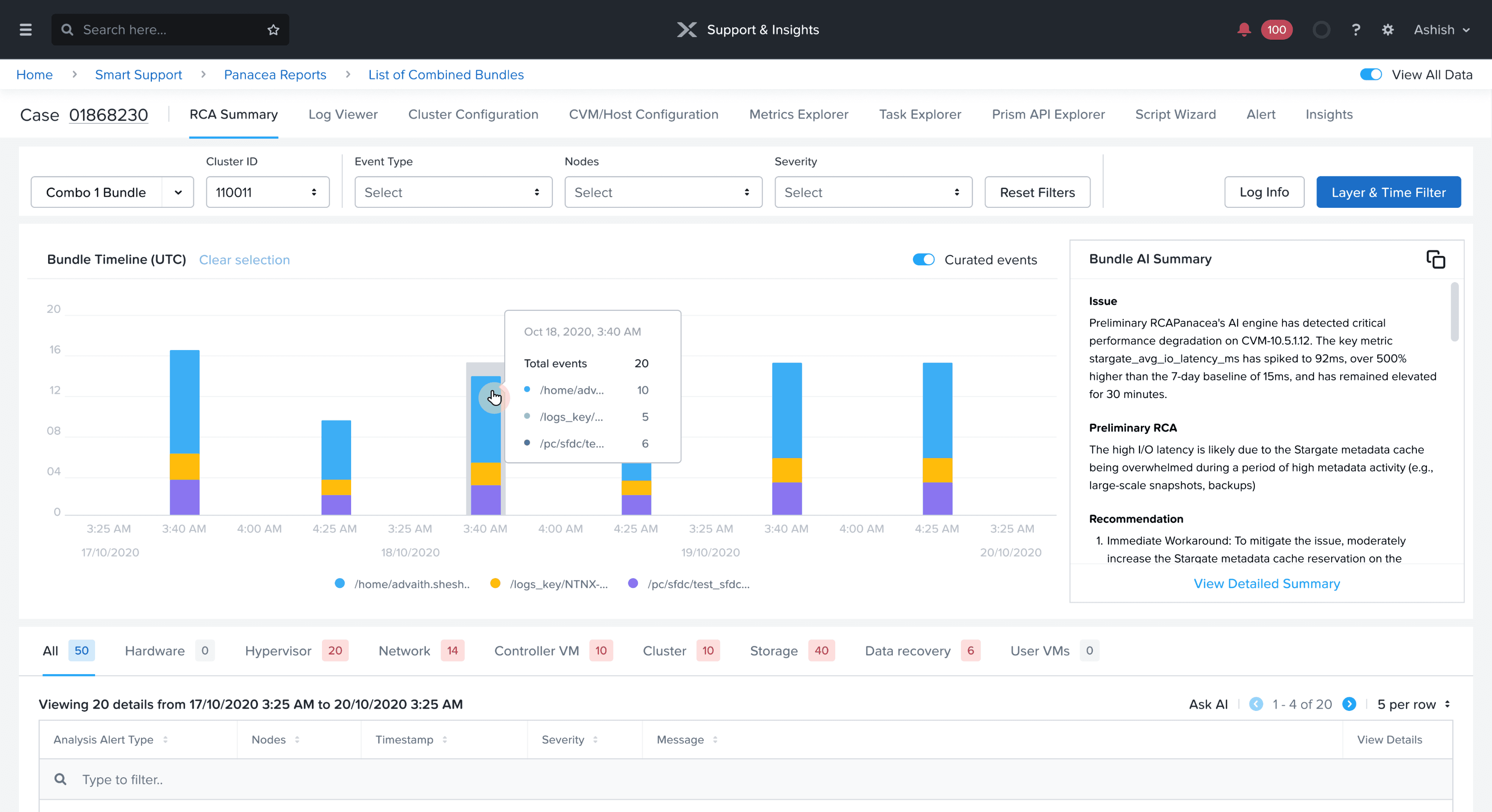
RCA Summary
Root cause analysis page. It provides a set of data showcased as graphs, table and a summary associated with the case number.
BEFORE

The page surfaced the data but offered little guidance for SREs investigating issues.
AFTER

Reorganised the layout to free up screen space for the content users work with
Curated events - Weeds out unnecessary events
Short Bundle AI summary with adequate details
Details of layers affected
Design system - Prism guidelines
Combo bundled for better correlation
Filters upfront to improve fast checking
Ask AI integrated to allow users to to find the reason for alerts.
Log Viewer
A temporal visualisation of log anomaly density and cluster events.Lets SREs immediately identify when an issue started and what preceded it replacing manual log scanning with pattern recognition at a glance.
BEFORE

Related data was split across the Log Explorer and Log Dashboard, so SREs had to piece together the full picture themselves.
AFTER - LOG COUNT

Combined Log count & Heat Map view
Reduced the switching between these pages
Ask AI capability same as RCA Summary page
Create rule for SREs to add certain new findings in anomalies
Curated logs - Weeds out unnecessary logs
Feature addition of wrap log lines
AFTER - HEAT MAP & SEVERITY COUNT

Combined Log count & Heat Map view
Reduced the switching between these pages
Ask AI capability same as RCA Summary page
Create rule for SREs to add certain new findings in anomalies
Curated logs - Weeds out unnecessary logs
Feature addition of wrap log lines
Cluster Configuration
It shows the total configuration of clusters and which one is affected with respect to the CVM IP
BEFORE

Poor navigation and layers made it difficult to read and interpret
AFTER

Reworked the lay out
Integrated the most important layers and sublayers
Metrics Explorer
Raw cluster metrics and CVM configuration data from Insights are surfaced directly within Panacea — eliminating the #1 context switch that previously broke SRE focus during triage.
BEFORE


Poor navigation and layers made it difficult to read and interpret
AFTER

Raw data from Version 1 of Panacea has been populated here
No need to switch back to the Version 1
Coordinated with design system team to implement new data visualisation - Chart
This whole page can eventually eliminate RCA Summary & Log viewer pages
Measured, not estimated
~8 min
Time to find the root cause, down from 45-90 minutes
45
SREs in user acceptance testing
405
Logs analysed in testing
55
Combo bundles analysed in testing
Next case study
Capillary Tech : Loyalty plus
Designed & built with care · Edwin Fernandez © 2026
Available for full-time roles